Create a campaign
A campaign combines sending accounts, a lead audience, and a workflow. Finish account setup and collect or import a lead group first.
Set up the campaign
Open Campaigns and create a campaign
Select Launch Campaign on the Campaigns page. You arrive at New campaign. Select the campaign-name control to enter a name that identifies the audience and purpose.
Select the sending accounts
Choose the connected X profiles you intend to use. Check each handle and account health. If no suitable account is available, repair its session in Accounts before continuing.
Choose the lead lists
Select the group or groups that form this audience. Review the unique-lead and DM-eligibility summary. Lists can overlap, so their displayed totals may add up to more than the unique campaign audience.
Pick a workflow
Use Simple DM for one message, Follow + DM to follow before messaging, or DM + Follow-up for an initial message and a conditional follow-up. Choose Build Custom Workflow when you need your own sequence.
Read every outgoing message
Review the actual message content, including the follow-up. A workflow name describes its structure; it does not make the default copy appropriate for your offer. Check names, links, variables, and factual claims.
Open the review dialog
Select Launch campaign. In Review campaign, inspect the campaign name, lead lists, workflow, sending accounts, messages, and eligible count. Use Cancel to correct anything.
Confirm creation, then inspect details
Confirm and launch creates the campaign and imports the eligible leads. Check the resulting campaign details and workflow. As stated in the review dialog, sending begins when you select Start.
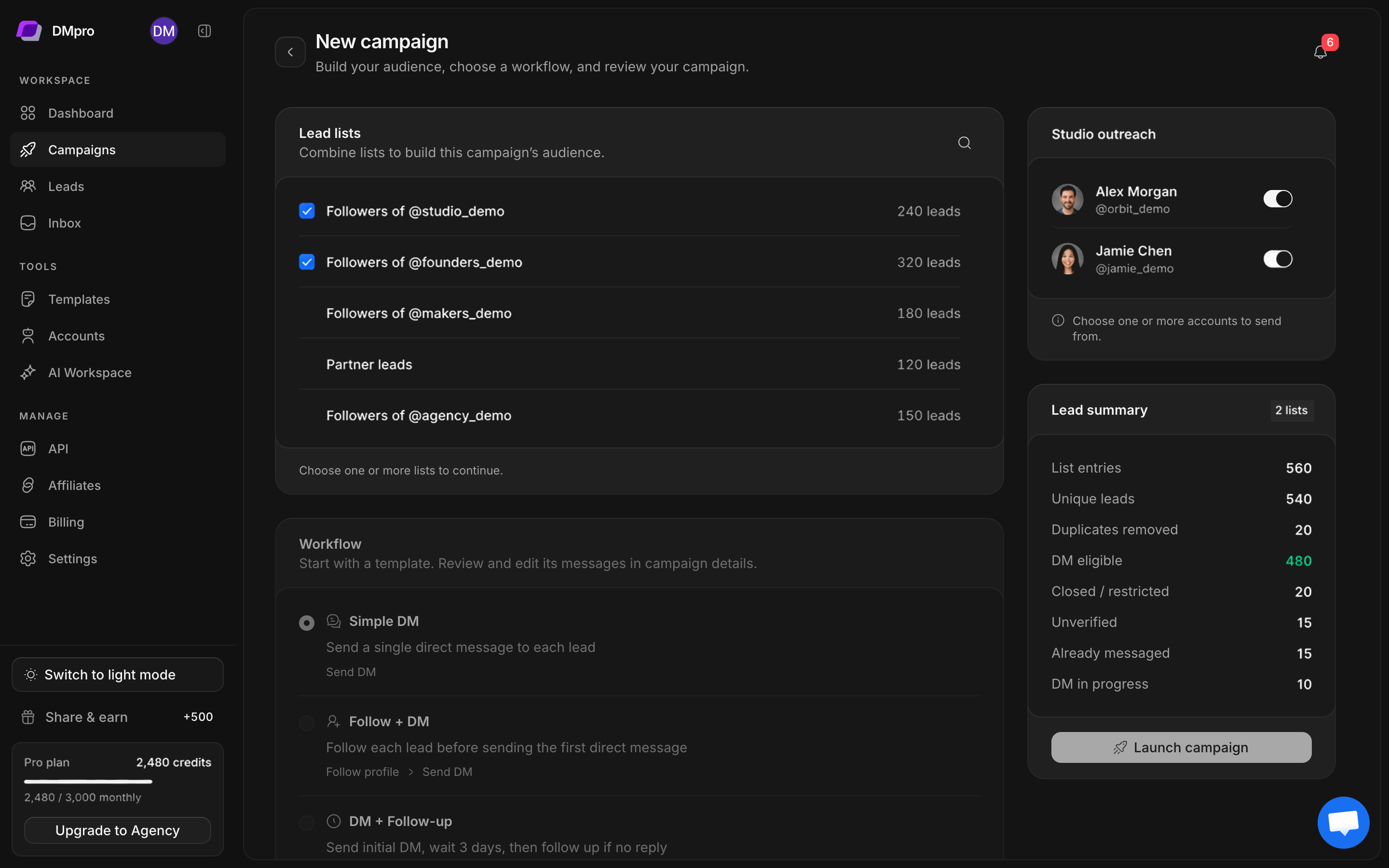
Understand the eligibility summary
| Count | How to read it |
|---|---|
| List entries | Combined entries from selected lists |
| Unique leads | Distinct lead records across those lists |
| Duplicates removed | Overlap removed from the combined audience |
| DM eligible | Leads currently eligible under the campaign rules |
| Closed / restricted | Profiles that cannot receive this campaign’s DM under the known access state |
| Unverified | DM access has not been established |
| Already messaged | Existing contact affects eligibility |
| DM in progress | A message operation is already being handled |
Review the live summary rather than assuming unknown access is open. An imported group total is not a sending guarantee.
Before selecting Start
Open the workflow and confirm its messages, branches, and timing. Verify that the right sender handles and lead audience appear in campaign details. Then follow Monitor, pause, and resume.